
Your Must-Have Linux Security Superpower: Mastering auditd


We were undergoing a security audit, and one of the critical checks was proving “who changed what and when” on our core server configuration files. We had basic logging, of course, but when the auditor asked for an immutable, kernel-level log proving that no one tampered with the SSH config file at 2:00 AM, my stomach dropped. We couldn’t prove it.
That incident taught us an important lesson that basic logging isn’t enough. You need kernel-level auditing. That’s when we started using the Linux Audit Framework (auditd) to record security-relevant information about our system, essentially keeping a detailed log of activity (especially for File Integrity Monitoring).
What is AuditD ?
The auditd tool is a powerful Linux utility that records security-relevant events, providing a comprehensive, detailed log of system activity.
It acts as a security logging framework for the Linux kernel.
It records events based on a set of configurable rules.
It’s crucial for security auditing, intrusion detection, and compliance.
By monitoring files, you can be alerted to unauthorized modifications, ensuring file integrity
Forget complex security modules for a moment. Think of
auditdsimply as a way to send specific instructions, (also known as rules) directly to the Linux Kernel. The kernel is already watching every action (every system call, like opening a file, etc). By loading our rules, we tell the kernel: “Hey, if anyone touches this specific file, write a detailed, uneditable record of it right now”. It’s Just Rules for the Kernel.
The Core Concept of AuditD: It’s Just Rules for the Kernel
Understanding the components makes it much easier to configure and troubleshoot later. Let’s imagine the system as a secure building.

The Security Guard at the Door: Watches all activity (system calls) and immediately flags suspicious activity based on a list of instructions. This is the Linux Kernel.
The Central Records Office: Receives the incident reports from the guard and files them securely in the archive (the logs). This is the
auditdDaemon.The Written Rulebook: Contains the specific instructions (rules) given to the security guard on what to watch (e.g., “Flag anyone touching the vault door”). This is the
auditdrule configuration file.
![[Image3: AuditD Flow]](https://substackcdn.com/image/fetch/$s_!mh4G!,f_auto,q_auto:good,fl_progressive:steep/https%3A%2F%2Fsubstack-post-media.s3.amazonaws.com%2Fpublic%2Fimages%2F3e1f5b37-c1d9-4cf3-b6b3-db968a4eeec9_770x392.gif "[Image3: AuditD Flow]")
How to Install AuditD
On major distributions like Red Hat Enterprise Linux (RHEL), CentOS, and their derivatives, the
auditpackage (which contains theauditddaemon and tools) is usually installed by default due to enterprise security and compliance requirements.On other distributions like Debian or Ubuntu, the package may or may not be part of the minimal base installation, but it is available in the repositories for easy installation (
apt install auditd).
Even when it’s installed, you often still need to ensure the service is running (systemctl start auditd).
Useful Commands and Config files of AuditD
Over time, We found that knowing a few key commands and config files makes working with auditd much easier. These are the ones we use most often to set rules, check logs, and keep an eye on what’s happening in the system.
1. Important Config Files
/etc/audit/auditd.conf: Main configuration for the audit daemon (log location, buffer size, etc.)/etc/audit/audit.rules: egacy single-file rule definition (loaded at startup)/etc/audit/rules.d/*.rules: Preferred location for modular rule files. This is where you define your rules./var/log/audit/audit.log: The main log file where all audit events are stored
2. auditctl
auditctl : Manage audit rules on the fly (view, add, or delete rules).
auditctl -l        # List all active rules
auditctl -s        # Show auditd status
auditctl -w /etc/passwd -p wa -k user-changes  # Watch a file for changes
3. augenrules
augenrules : Load rules from files in /etc/audit/rules.d/
augenrules --load # Apply all rules defined in the rules.d directory4. ausearch
ausearch : Search audit logs for specific events.
ausearch -k user-changes     # Search logs using a key name
ausearch -x passwd           # Search by executed command
5. aureport
aureport : Generate readable summary reports from audit logs.
aureport -au     # Show authentication logs
aureport -f      # Show file access reports
aureport -k      # Show logs grouped by key
6. systemctl
systemctl : Control the auditd service.
systemctl status auditd
systemctl restart auditd
All these tools work together to create a complete auditing workflow. We define what to monitor using rules (auditctl or augenrules), the auditd daemon collects and writes those events into /var/log/audit/audit.log, and then you can analyze or summarize the results using ausearch and aureport. This setup gives you a full picture of what’s happening on your system from file changes to user actions, all in one place.
The auditctl Command and Rule Syntax
The auditctl command is your interface to the kernel’s auditing system. You use it to load and unload rules in real-time.
1. The -w Flag: File Watch Rule (File Integrity Monitoring)
The -w flag stands for “watch” and is the key to performing File Integrity Monitoring (FIM). It tells the Linux Kernel to monitor a specific file path or directory for any access or modification based on the permissions you specify.
What it Audits: Access to a file’s inode (the file’s unique identifier). This is how you track changes to specific resources like configuration files.
The Syntax: Requires the file path and the permissions to watch:
auditctl -w <path> -p <permissions> -k <key>Permissions (
-p): You combine these single letters to define what activity triggers the event:r(Read): Viewing the file’s content.w(Write): Modifying, deleting, or appending to the file.x(Execute): Running the file.a(Attribute): Changing file metadata (ownership, permissions, timestamps).
You should focus on two core permissions when watching files: Write (w) and Attribute change (a).
Example: The following rule catches any edits or changes to permissions on your SSH server settings (/etc/ssh/sshd_config file)
auditctl -w /etc/ssh/sshd_config -p wa -k SSH_CONFIG_FIM2. The -a Flag: Action/Filter Rule (System Call Monitoring)
The -a flag stands for “action/filter” and is used to log a system call or control a feature of the audit system itself. This rule is generally more complex as it targets kernel functions rather than specific files.
What it Audits: The invocation or completion of a specific system call (like execve or settimeofday) when a set of conditions are met.
The Syntax: Requires an action, a filter, and typically a system call name (-S) and conditions (eg: architecture -F arch):
auditctl -a <action>,<filter> -S <syscall> -F <field=value> -k <key>Action and Filter (
-a <action>,<filter>) : This defines when an audit record is generated. Action: Almost always set toalways. This tells the kernel always to create an event record if the rule’s conditions are met. Filter: Defines where in the system’s process flow the rule should apply. For security, the most common isexit, which applies the rule after a system call has completed (whether it succeeded or failed). (Example:-a always,exitmeans “Always generate an event record right after the system call finishes”).Field=Value (
-F <field=value>) : These are the conditions that must be met for the rule to fire. These conditions filter the huge number of system calls down to only the security-relevant ones. (Example:-F uid=1000Filter for actions performed by user ID 1000).Usage: It’s used to log activities like running privileged commands, making network changes, changing the system time, etc.
Example: Logs whenever the adjtimex or settimeofday system calls are used to alter the system clock. (I use the -F arch=b64 to be specific to my 64-bit systems).
auditctl -a always,exit -F arch=b64 -S adjtimex,settimeofday -F key=TIME_CHANGE_AUDIT** The Key: Your Secret Weapon for Searching
The most important lesson I learned is the -k (key) flag. The key is a simple, user-defined tag that I attach to every rule. Instead of searching the raw logs for a cryptic system call number or file inode, I just search for the tag I created (e.g., SSH_CONFIG_FIM or TIME_CHANGE_AUDIT). This instantly gives me a list of all related events.
Pro Tip: Locking the Rulebook
My final, non-negotiable step: Once you’ve loaded all your rules, you must protect the rule set itself from being tampered with or disabled by an attacker who gains root access (a classic “Defense Evasion” technique).
I always ensure this rule is the last line of my /etc/audit/rules.d/audit.rules file:
# This makes all preceding rules immutable until the next reboot
-e 2
This effectively locks the audit configuration, forcing an attacker to reboot the entire system just to disable the audit trail, an action that itself will be logged!
Bringing the Logs to Life (Wazuh Integration)
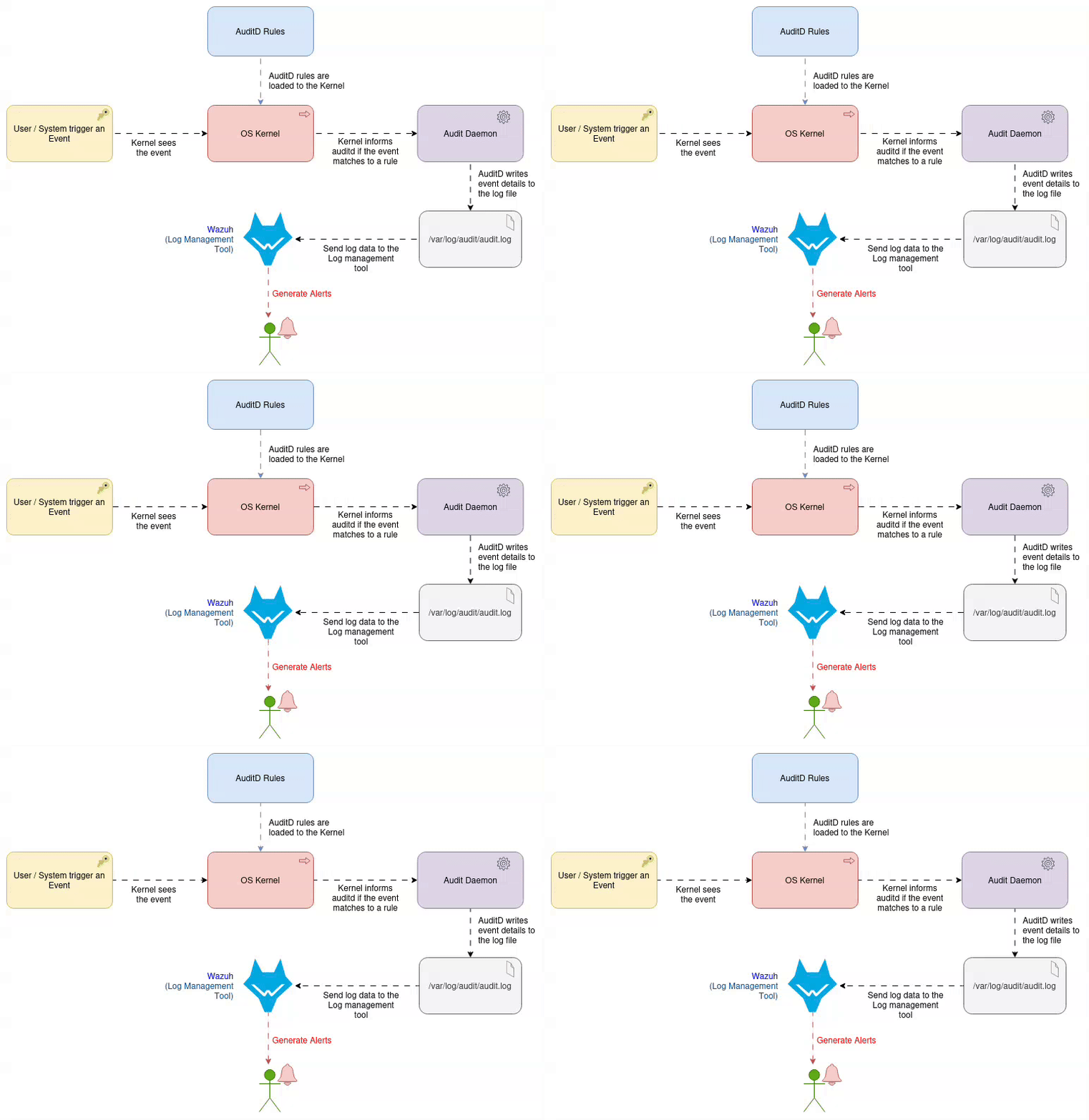
The ultimate goal isn’t just generating log files; it’s getting timely alerts. We feed our audit logs directly into a Log Management solution:
Wazuh: The agent reads the raw logs and uses its internal rules engine to turn those cryptic lines into a clean, intelligent alert like: “Root user modified SSH config file on server A.”
“ FYI: Wazuh is an open-source security platform used for threat detection, incident response, compliance monitoring, and security visibility across endpoints, servers, and cloud environments. ”
You can integrate the logs with any log management tool you use, such as ELK, Datadog, New Relic, or Grafana Loki.
By implementing these two types of rules and centralizing the logs, you transform auditing from a compliance headache into a real-time security superpower. You can prove exactly who did what, giving you confidence and making your forensics job a million times easier!
Check out my other blog post, “Harden Your RHEL Servers auditd Rules: A Practical Guide for SREs and Security Engineers,” for a baseline set of audit rules for Red Hat server environments.
Cheers!!